
Track calories without an app account
Published by Evercrest Technologies LLC · Reviewed October 3, 2026
NexoPlate lets you keep a food log on your iPhone without creating a NexoPlate account, email login, or password. Manual tracking and barcode scanning are free. “No account” describes the app’s login model; online features still process selected information.
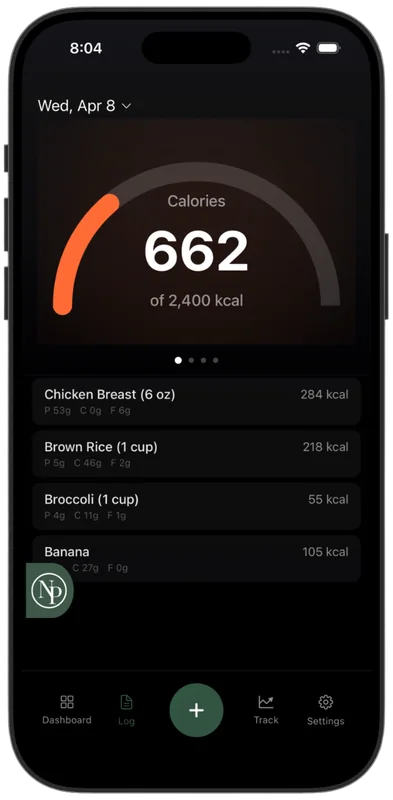
Start with a local food log
- Install NexoPlate on an iPhone with iOS 17.6 or later.
- Set your preferences and tracking goals in the app.
- Log a meal manually, select a saved food, or look up a barcode. Review portions before saving.
What works offline?
Manual logging, saved foods and meals, weight tracking, and your dashboard work offline. New food searches and barcode lookups generally need a connection, although cached results may be available. AI Photo Entry and Coach require online processing.
What leaves your device?
When you use AI, selected photos, messages, and app context are sent securely for processing. Coach context can include food logs, goals, profile details, weight, activity, and saved memories. Our backend retains temporary Coach session state and separate usage or result-cache records. Subscription validation and support requests also involve server-side records.
Food-log storage and online AI processing are different. Read the privacy policy and retention details before choosing the features you use.
Apple ID and subscription access
An Apple ID used for the App Store is separate from a NexoPlate account. For an App Store subscription, use Restore Purchases with the same Apple ID. For a website subscription, redeem the emailed access code in the app; no NexoPlate login is needed. Installation and activation instructions.
Protect your local records
NexoPlate does not provide a restorable cloud backup of your food log. Check your device backup before deleting the app or changing phones. Restoring a purchase restores access, not your food-log history. Deleting the app does not cancel a subscription or erase separate service records.
Privacy and backup questions · How optional photo estimates work